When adding a Sample via Add Multiple Samples the Type for the Samples will need selecting.
Selecting a Type for a Sample:
Editing an existing Sample:
1. To edit an existing Sample, an override will be required. (You will need to be a Super User to be able to perform an override)
2. To perform an override, right click on the Booked In By Box and press Override.
3. Enter the appropriate details.
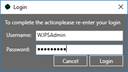
4. The form will now be editable.
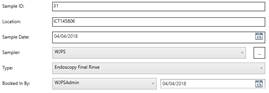
5. Once details have been changed, Press the Save Button.
6. A message box will be displayed to show the save has been completed.